
Your camera records what you see. Supervisors can watch live, and saved clips go to Discord.
Commands
| Command | What it does | What you will see |
|---|---|---|
/bodycam | Turns your body camera on or off. Works on foot or in a vehicle. | The body cam box in the top-right corner of your screen. |
/dashcam | Puts a dash cam in, or takes it out of, the vehicle you are sitting in. It only works in police vehicles that have been set up for it. | “Dashcam Installed and Active”, “Dashcam Uninstalled”, or “Dashcam can not be used in this vehicle”. |
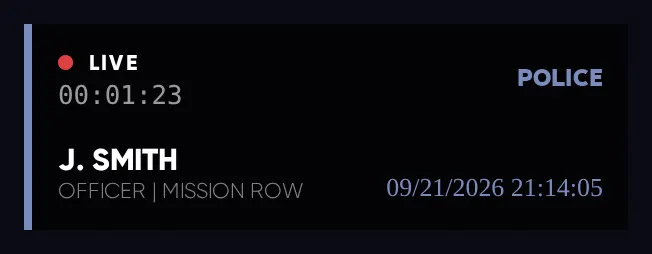
The body cam box
| On the box | What it tells you |
|---|---|
| LIVE and a timer | The camera is on, and how long it has been running. |
| Department | Which department the camera belongs to. |
| Name, rank and station | Yours. A profile picture is taken automatically when the camera turns on. |
| Date and time | Stamped on everything the camera records. |
The camera dashboard
For supervisors: watch cameras live and play back clips.

| Button | What it does |
|---|---|
| Dash Cameras | Live feeds from police vehicles. |
| Body Cameras | Live feeds from officers on duty. You cannot watch your own camera. |
| Saved Recordings | All saved clips. Search, play, add a description, or delete. |
| Record | Records the camera you are watching. Settings: clip length (60 seconds by default, 180 at most), microphone on or off, and where the body cam box sits. |
- Open it at the dashboard terminal at the station, or from inside a police car that has access.
- Only senior ranks can open it. Command decides which rank. If you are refused you will see “You dont have access to dashboard”.
- Saved clips are sent to the department’s private #body-cams channel on Discord.
Turn on
/bodycambefore every traffic stop, arrest, or call where you might need to use force (LEO-3.1). If there is no footage, there is no proof of what you did.
Highrise City RP · Highrise PD Law Enforcement Guide · Version 0.1 15 / 18